
Universal CNC Tightening Fixture: How to Select and Use One
Posted by RMT on Sep 27th 2026
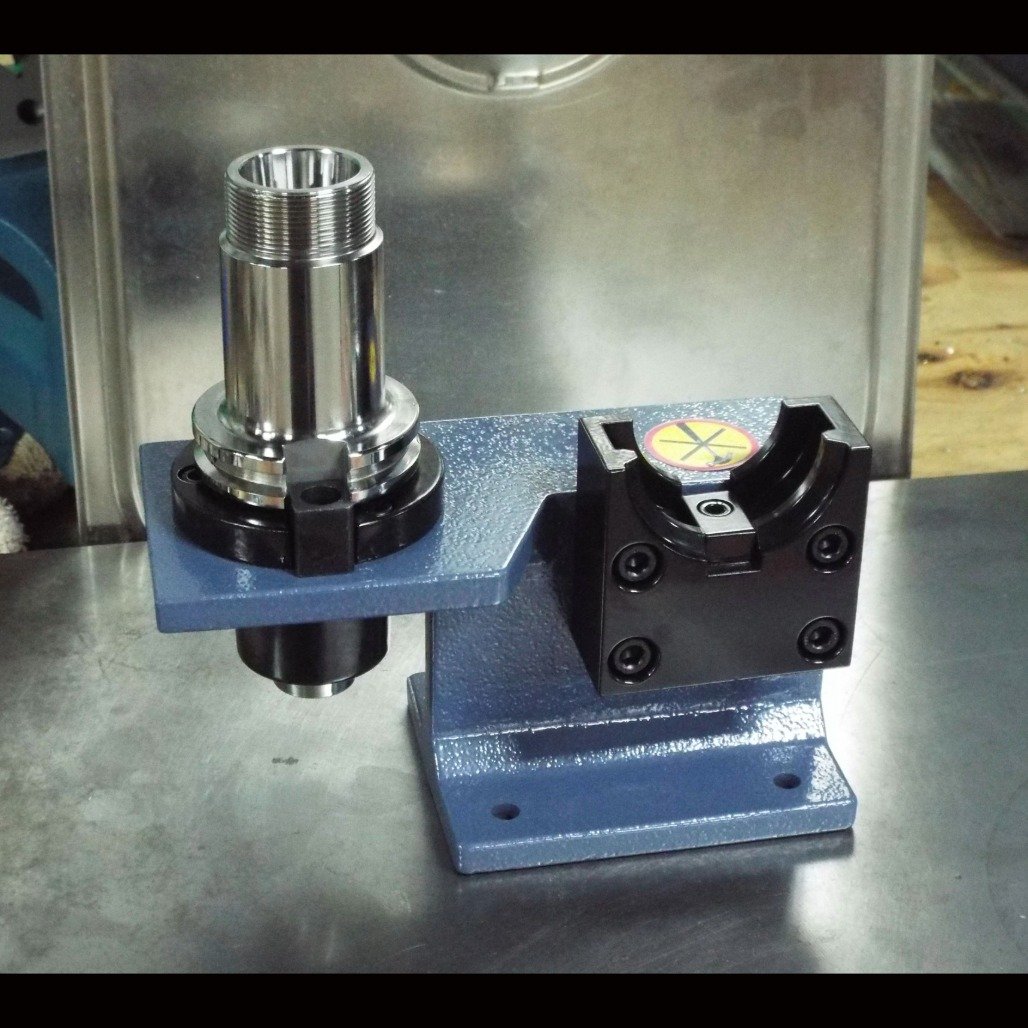
“Universal” doesn’t confirm compatibility. Before ordering a universal cnc tightening fixture, match its interface to your machine, holder, and tightening workflow.
A fixture that doesn’t suit your setup can make tool changes inconsistent or risk damage. A product listing without key details can also leave you guessing. Choose based on documented requirements, not the product name alone. This guide explains how to check machine and tooling interfaces, dimensions, capacity, materials, and included components, then compare the fixture with the way your shop handles tightening. It also covers how to follow the manufacturer’s operating instructions and build a repeatable process without assuming specifications the listing doesn’t provide. Ridiculous Machine Tools sells a Universal CNC Tightening Fixture, but the available product information does not confirm its interface or other specifications. Check the current listing against your setup before buying.
Key Takeaways
- Treat “universal” as a product description, not proof that the fixture fits your machine or tooling.
- Record the tightening task, machine and holder interfaces, required clearance, and operating needs before comparing options.
- Compare documented dimensions, operation, and intended task to judge whether a fixture can support a repeatable setup.
- For a universal cnc tightening fixture, confirm the exact specifications and instructions before use instead of relying on assumptions.
- Check the Ridiculous Machine Tools product listing for current compatibility details, availability, and price before ordering.
What a Universal CNC Tightening Fixture Does, and What “Universal” Does Not Guarantee
A CNC tightening fixture supports the positioning and handling of tooling during a repeatable tightening operation. Its role is to help make the setup consistent, not to machine a workpiece or hold one for cutting. A universal cnc tightening fixture still needs to suit the tooling and tightening task you intend to perform.
The word “fixture” can describe different equipment. A conventional work-holding or support device locates and supports a workpiece during manufacturing. A CNC tightening fixture, by contrast, is evaluated for a tool or holder tightening workflow. Don’t assume it performs both jobs.
Where the fixture fits in a CNC tooling workflow
Start by identifying the tool or holder being tightened, the components involved, and how the operator needs to position and handle them. A dedicated setup can support repeatable handling from one tightening cycle to the next. It does not, by itself, establish a torque value, guarantee tool-holder accuracy, or replace the machine’s workholding setup. Those details depend on the tooling, process, and documented instructions.
What “universal” should prompt you to verify
Read “universal” as a reason to check fit, not as proof that every machine and holder is supported. Confirm the interface, compatible tooling, fixture dimensions, and operating details in the product documentation. Check that there is enough room to position the parts and operate the fixture as directed. If a required detail is missing, get confirmation before purchase rather than inferring compatibility from appearance or the product name.
Ridiculous Machine Tools lists a Universal CNC Tightening Fixture for sale, but the available product information does not establish its interfaces, dimensions, included components, or compatibility. Compare the current listing with the machine, holder, and tightening requirements you’ve recorded. If it doesn’t answer a fit or operation question, resolve that before ordering or using the fixture.
How to Check CNC Tightening Fixture Compatibility Before You Buy
Compatibility depends on documented interfaces, not the word universal. Before comparing options, record the machine, holder, tightening task, and operating requirements. Then use this sequence to check whether a fixture fits your setup:
- Identify the task. Note which tool or holder you need to tighten and how the operator will position it.
- Record the machine interface. Use machine documentation to identify relevant spindle or tooling details. CAT40 is one example to verify, not confirmed compatibility with any particular fixture.
- Record the holder and tooling. List the holder type and any components involved in the tightening operation. A tool holding selection guide can help with broader tooling context.
- Check clearance. Assess the available space around the intended work area, including room for the holder, fixture, and operator access.
- Confirm the documentation. Compare your notes with the product listing and instructions. Resolve missing fit or operation details before ordering.
Match the fixture to the machine and tooling interface
Gather machine and holder information from their documentation, then compare it only with interfaces explicitly listed for the fixture. Don’t infer compatibility from a shared taper name, a familiar holder, or a product photo. The workholding principles Purdue University describes concern securing parts for machining. That is separate from tightening tooling, so keep the two requirements distinct as you assess the setup.
Check access, clearance, and operating requirements
Consider where the fixture will sit during the tightening task and whether the operator can position the tooling and follow the documented procedure without obstruction. Check whether the listing specifies a mounting method, required accessories, or operating steps. Don’t estimate dimensions, capacity, or included parts from appearance. If those details are absent, confirm them before purchase.
Apply the same checks to a universal cnc tightening fixture, even if its name suggests broad application. Ridiculous Machine Tools lists a Universal CNC Tightening Fixture, but the available information does not establish its interfaces, dimensions, capacity, materials, or included components. Review Ridiculous Machine Tools’ CNC tooling and verify the current listing against your documented requirements before ordering.
Compare Tightening Fixtures by Repeatability, Usability, and Documented Specifications
A useful comparison separates what the product listing confirms from what you still need to verify. “Universal” doesn’t mean one fixture fits every machine or holder. Compare each option against the tightening task, then assess whether its documented features support consistent handling and practical access in your shop.
| Comparison point | What to check | Why it matters |
|---|---|---|
| Interface | Which machine, holder, or tooling interfaces the listing explicitly names | Confirms whether the fixture is intended for your setup |
| Dimensions | Published measurements and any stated mounting requirements | Helps establish fit and available operating clearance |
| Operation | Documented positioning and tightening steps | Shows whether operators can follow a consistent process |
| Documentation | Instructions, compatibility details, and listed specifications | Separates verified claims from unanswered questions |
| Intended task | The tool or holder tightening operation the fixture is designed to support | Keeps the comparison focused on the work the fixture must perform |
Which product specifications matter for your application?
Prioritize compatibility, dimensions, materials, and operating instructions when the listing provides them. Check that the stated interface matches your machine and tooling, and that the described operation fits your workflow. A fixed position and clear operator access can help make setup steps easier to repeat, but don’t assume either without reviewing the product information and intended use.
Capacity, tolerance, or material data may also matter to your decision. If the listing omits one of these details, treat it as an open question. Don’t substitute a specification from a different product or infer performance from the word “universal.”
When a tightening fixture may not be the right solution
Pause before ordering if the listing doesn’t document the interface or task you need, or if dimensions and operating requirements remain unclear. Ask for confirmation rather than relying on a visual match. If you’re still considering the holder itself, review this heavy-duty end mill holder guide as part of evaluating the wider setup.
For Ridiculous Machine Tools’ Universal CNC Tightening Fixture, the available information does not establish its interface, dimensions, material, capacity, or operating details. Use the current product listing to verify its specifications before comparing it with other options. A universal cnc tightening fixture is a candidate only when its documented details align with your requirements.
How to Prepare and Use a CNC Tightening Fixture Consistently
A repeatable process starts with confirmed instructions, a clean work area, and the correct tooling. The steps below are general preparation guidance, not a substitute for the fixture manufacturer’s operating procedure. Follow the product instructions for exact setup and operation. Don’t assume a tightening sequence, torque value, or safety limit that the documentation doesn’t specify.
Set up the work area and confirm the fixture
Before each setup, confirm the fixture model and intended application against its product documentation. Check that the tooling and task match the documented use. Then prepare the area:
- Clear items that could obstruct positioning or operator access.
- Inspect the fixture and relevant contact surfaces for debris, wear, or visible damage. Clean surfaces as appropriate for the materials and manufacturer’s instructions.
- Position the fixture as directed. Confirm it sits securely and that the operator can reach the working area without obstruction.
- Check that the holder and other components are oriented and seated as the instructions require before starting the tightening operation.
Stop if the fixture shifts, a part doesn’t seat as expected, or the documented setup doesn’t match the equipment in front of you. Resolve the discrepancy before proceeding. Don’t compensate by adding force or changing the procedure without manufacturer guidance.
Follow documented operating steps and check the result
Use the manufacturer’s stated method from start to finish. A consistent operator routine means repeating the same verified positioning and handling steps, not relying on memory or inventing a tightening method. After the operation, check that the components remain in the intended position and that nothing appears displaced or damaged. If the result differs from the expected setup, pause and review the instructions before continuing.
Once the fixture’s instructions are confirmed, document the shop procedure in clear, task-specific steps. Include the fixture identification, the tooling used, the required positioning checks, and any operation details provided by the manufacturer. Leave unsupported values out of the procedure. This gives operators a shared reference and makes it easier to repeat the approved process across setups.
Ridiculous Machine Tools sells a Universal CNC Tightening Fixture, but the information available does not specify its operating instructions or compatibility. Review the current listing and confirm the details before adding the fixture to a shop procedure. Review the Universal CNC Tightening Fixture listing before use.
Evaluate the Ridiculous Machine Tools Universal CNC Tightening Fixture
Ridiculous Machine Tools lists a Universal CNC Tightening Fixture for sale. The available product information does not establish its supported interfaces, dimensions, capacity, materials, included components, or operating instructions. Treat the current listing as the place to verify those details, not as evidence that the fixture fits every machine or holder.
Ridiculous Machine Tools specializes in machining tools and accessories, including a range of toggle clamps and CNC tightening fixtures. That product range provides relevant context, but it does not confirm the performance or compatibility of this specific fixture. Base your purchase decision on product details you can verify against your shop’s documented requirements.
What to confirm on the product listing
Before ordering, review the current listing for information that directly affects fit and use:
- Intended application: Does the documented use match the tool or holder tightening task you need to perform?
- Supported interfaces: Are your machine and tooling interfaces explicitly identified?
- Dimensions and mounting: Are measurements and any mounting requirements provided, and do they suit the available space?
- Included components: Does the listing specify what comes with the fixture?
- Operating instructions: Are setup steps or additional requirements documented?
- Current purchase details: Confirm availability and price on the listing, since these can change.
If a required specification isn’t listed, don’t infer it from the product name or appearance. Seek clarification from the seller before purchasing. That’s especially important when compatibility, clearance, or an operating step determines whether the fixture can be used in your workflow.
Make the purchase decision against your shop requirements
Compare verified listing details with the machine, holder, clearance, and tightening requirements you recorded before shopping. A match on the intended task alone may not be enough if the interface or dimensions remain unconfirmed. Mark each requirement as documented, unanswered, or not matched. Resolve unanswered items before ordering, and rule out the fixture if a documented detail conflicts with your setup.
This check keeps the decision grounded in evidence. The term universal cnc tightening fixture does not replace interface and operating specifications. Verify the current product information and decide based on the requirements of your actual setup.
Review the Universal CNC Tightening Fixture and confirm its current specifications, compatibility, availability, and price before ordering.
Make Your Fixture Decision With Confidence
Select a universal cnc tightening fixture by matching documented interfaces, dimensions, and operating instructions to your machine, holder, and shop workflow. “Universal” alone doesn’t confirm compatibility. Before use, follow the manufacturer’s procedure and repeat only steps supported by the fixture documentation.
Ridiculous Machine Tools sells machining tools and accessories, including a Universal CNC Tightening Fixture. The current product listing is where to check the fixture’s specifications, compatibility, availability, and price. Confirm any missing details before ordering.
Compare the listing with your recorded requirements and resolve unanswered fit questions before you decide. Review the Universal CNC Tightening Fixture and confirm whether its documented details suit your setup.
Frequently Asked Questions
What is a universal CNC tightening fixture?
A universal CNC tightening fixture is a tool intended to support positioning and handling during a tool or holder tightening operation. Its purpose is distinct from a CNC machine fixture used to locate and hold a workpiece for machining. “Universal” is a product description, not a defined compatibility standard. Check the fixture’s documented application and interfaces against the tooling and workflow you plan to use.
Does a universal CNC tightening fixture fit every CNC machine?
No. The word “universal” doesn’t confirm fit with every machine, holder, or tightening interface. Compatibility depends on the interfaces and applications documented for the specific product. For example, don’t assume a fixture supports CAT40 tooling unless the product information says so. Compare the listing with your machine and holder documentation, and get clarification if a required interface or fit detail is missing.
How do I choose a CNC tightening fixture for my setup?
Start by recording the tightening task, machine and holder interfaces, tooling, available clearance, and operator access requirements. Compare those details with the fixture’s intended application, dimensions, mounting information, and operating instructions. Treat each requirement as confirmed, unanswered, or incompatible. Resolve unanswered compatibility questions before ordering. This keeps the choice tied to your actual workflow rather than assumptions based on a product name.
Can a tightening fixture improve setup repeatability?
A fixture can support repeatability by helping operators position and handle tooling consistently, provided it suits the task and is used as documented. It doesn’t guarantee a particular tightening result, tool accuracy, or machining performance. To make the process repeatable, use the manufacturer’s instructions and record the verified steps for your shop. Don’t add torque values or a tightening sequence unless the documentation specifies them.
What specifications should I check before buying a CNC tightening fixture?
Check the intended application, supported interfaces, dimensions, mounting method, included components, and operating instructions. Review any stated capacity, material, or tolerance information if those details matter to your task. Don’t infer an omitted specification from product images or the word “universal.” If fit, access, or operation depends on information the listing doesn’t provide, ask the seller to clarify it before placing an order.
How do you use a CNC tightening fixture safely?
Follow the fixture manufacturer’s instructions and your shop’s applicable safety procedures. Before starting, verify that the fixture and tooling match the documented application, clear the work area, inspect contact surfaces, and confirm stable positioning and operator access. Use only the specified operating steps. Don’t assume torque values, tightening sequences, or safety limits. Stop and resolve any mismatch, unexpected movement, or unclear instruction before continuing.
Where can I find the specifications for the Ridiculous Machine Tools fixture?
Check the current Universal CNC Tightening Fixture product listing on the Ridiculous Machine Tools website. Verify the intended application, supported interfaces, dimensions, included components, operating instructions, availability, and price there. The information available for this article doesn’t establish the fixture’s specific compatibility or technical details. If a specification you need isn’t shown on the listing, seek clarification from the seller before deciding whether it suits your setup.