

Techniks Tightening Stand vs Bench Fixtures Compared
Posted by RMT on Oct 11th 2026

The techniks universal tightening stand vs bench mounted tool fixtures decision starts with the toolholder interface, then comes down to how operators access and handle holders during setup. Comparing compatibility, mounting, clearance, and workflow helps you identify which fixture format suits your tool-preparation station.
Universal tightening solutions feature advanced auto-locking roller-bearing designs and broad compatibility with CAT40, BT40, HSK63A/E/F, C6, and ISO40 connections. Ridiculous Machine Tools offers Universal CNC Tightening Fixture configurations for CAT/BT30, CAT/BT40, and CAT/BT50 holders. The comparison below separates those listed details from the practical factors to assess when selecting a fixture.
Key Takeaways
- Match the fixture to the toolholder’s exact taper or connection before comparing stand and bench-mounted formats.
- Mounting, operator access, wrench clearance, and bench layout affect how a fixture fits your tightening workflow.
- Techniks lists an auto-locking roller-bearing design for its 17846B, with compatibility for the connections stated in its product information.
- RMT offers Universal CNC Tightening Fixture configurations for CAT/BT30, CAT/BT40, and CAT/BT50 holders.
Techniks Universal Tightening Stand vs. Bench-Mounted Tool Fixtures: What Is Different?
A tightening stand or bench-mounted fixture supports a toolholder while an operator tightens or loosens its tooling. “Stand” describes a fixture format, while “bench-mounted” describes how a fixture is arranged in the work area. Neither term by itself tells you which holders fit or how they are retained. In a techniks universal tightening stand vs bench mounted tool fixtures comparison, the useful distinction is the combination of interface compatibility, fixture design, and operator workflow.
| Comparison point | Stand | Bench-mounted fixture |
|---|---|---|
| Mounting | Standalone format; check how the specific model is supported. | Arranged at a bench; check the model’s stated mounting method. |
| Access | Depends on holder orientation and surrounding clearance. | Depends on bench position, fixture layout, and wrench clearance. |
| Workflow | Assess operator access during tightening and tool changes. | Assess how a fixed station fits repeated setup tasks. |
| Verify | Compatible interfaces and model details. | Compatible interfaces, mounting, and model details. |
What the Techniks roller-bearing stand listing documents
Techniks describes its 17846B stand as having an auto-locking roller-bearing design intended to reduce slippage. The product information lists CAT40, BT40, HSK63A/E/F, C6, and ISO40 connections. Those are the interfaces listed for this model, not a compatibility list for every tightening stand. A machine taper system is one part of the holder-to-fixture interface, so compare the taper reference with the exact toolholder and fixture information.
What “bench-mounted fixture” can mean in practice
Bench-mounted describes an arrangement, not a standardized fixture design. Models can differ in how they support a holder and leave room for tightening tools. Don’t infer an anchoring method, capacity, dimensions, or compatible taper from the label alone. Check the individual model information against the holder interface, available workspace, and tasks performed at the station.
Compare Toolholder Compatibility, Locking, and Bench Setup
A practical comparison treats compatibility as a model-specific check, not an assumption based on a broad product label. CAT, BT, HSK, and ISO refer to different toolholder interfaces. A fixture listing for one interface does not establish compatibility with another. Match the holder and fixture information before relying on a description such as “universal.”
Match the fixture to the toolholder interface
Identify the exact taper or connection on the holder first, then compare it with the fixture model’s stated compatibility. The Techniks listing gives multiple connection references for the 17846B, but that list should not be applied to other stands or bench fixtures. Check the holder’s size and configuration as well as its interface. Treat the locking method as a separate feature: Techniks identifies an auto-locking roller-bearing design on its stand, while other fixtures may use different retention methods.
Assess mounting and operator access
Evaluate the workstation rather than assuming one fixture format is more stable or easier to operate. Footprint and orientation depend on the model. Check how much bench space is available, whether holders can be inserted and removed without obstruction, and whether the wrench has a clear path during tightening. Also consider the operator’s position and whether the fixture provides usable access to the holder throughout the task.
Selection checklist: verify the holder interface, the fixture’s mounting method, tool and wrench access, and all operating requirements stated for the model. If the station handles more than one toolholder type, compare each interface with the fixture information instead of relying on a general product label.
For a product-level comparison, review Ridiculous Machine Tools’ Universal CNC Tightening Fixture options alongside the holder details used in your shop.
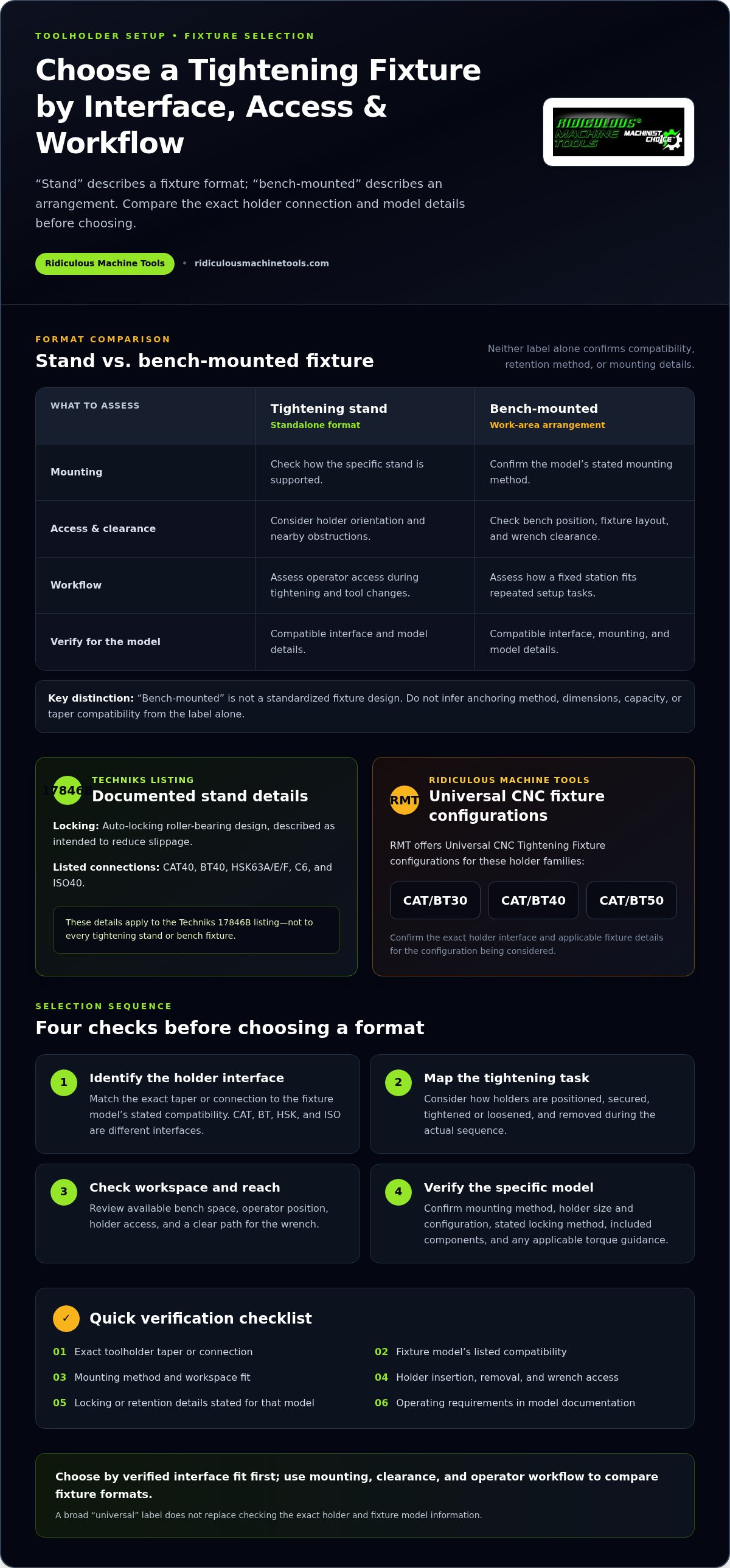
How to Choose Between a Tightening Stand and Bench-Mounted Fixture
Use four checks to make the techniks universal tightening stand vs bench mounted tool fixtures decision: identify the toolholder interface, define the tightening tasks, assess the bench layout, and compare the exact fixture model’s information. This keeps selection tied to your tooling and workflow rather than the fixture label alone.
Choose around tool changes and tightening frequency
For frequent tool changes, consider how holders are inserted and removed, where the operator stands, and whether a wrench can reach the relevant surfaces throughout the task. A stand may suit a workstation with limited space if its documented footprint and holder access fit the layout. A bench-mounted arrangement may suit a fixed setup station where the fixture can remain in a defined position. These are workflow considerations, not claims that one format is inherently more stable or faster.
Walk through the actual sequence: position the holder, secure it as specified, tighten or loosen the tool, and remove the holder. Note any obstruction or awkward reach, especially if several operators share the station. This simple layout check can help identify access issues before you settle on a fixture format.
Check specifications before purchase
Separate stated features from details that need to be verified for the individual model. A listed connection should not be assumed to cover every size or configuration, and a feature described for one stand should not be attributed to other fixtures.
| Compare | Documented feature | Confirm in model documentation |
|---|---|---|
| Interface | Connections listed for the specific model | Exact holder taper, size, and configuration |
| Mounting | Stand or bench arrangement described | Mounting method and space requirements |
| Operation | Any stated locking feature | Included components and applicable torque guidance |
Compare the product information with the holders and tightening tools used at your station. For CAT/BT fixture options, review the applicable Universal CNC Tightening Fixture details.
Where RMT Universal CNC Tightening Fixtures Fit the Comparison
The choice between a Techniks stand and a bench-mounted fixture depends on the toolholder interface, the fixture’s stated features, and the way the setup station is used. RMT’s Universal CNC Tightening Fixture configurations provide another option to consider when comparing CNC toolholder setup equipment.
Ridiculous Machine Tools offers configurations for CAT/BT30, CAT/BT40, and CAT/BT50 holders. These options help narrow the product review to the interface used in your shop. Compare the applicable product details with the exact holder and tightening tasks in your workflow, including the space and access needed at the station.
Connect fixture choice to the toolholding system
Start with the toolholding interface. Information about toolholder types and taper connections can help clarify how a fixture fits into the shop’s tooling system. Workholding references address a different, related task: locating and securing workpieces during machining. Keep the distinction clear. A CNC tightening fixture supports toolholder setup; a CNC machine fixture holds workpieces for an operation.
Use the same checks for each candidate: confirm the holder interface, review the model’s stated features, and assess how the fixture fits the tool-change station. RMT’s CAT/BT configurations give shops specific options to compare, while the applicable product details provide the basis for selecting a configuration.
Review RMT Universal CNC Tightening Fixtures
Choose the Fixture That Fits Your Tooling Workflow
The practical choice between a stand and a bench-mounted fixture rests on three things: the holder interface, the fixture’s stated compatibility, and operator access during tightening. The techniks universal tightening stand vs bench mounted tool fixtures comparison is most useful when you weigh those factors together rather than treating the format label as a specification.
RMT offers Universal CNC Tightening Fixture configurations for CAT/BT30, CAT/BT40, and CAT/BT50 toolholders. RMT also states that USA-based quality control and inspection follow the specifications established for each product. Compare the relevant configuration with your toolholders and workstation requirements to make a practical selection.
With the interface and workflow aligned, you can choose a tightening setup that fits the actual tasks and layout of your tool-preparation station.
Frequently Asked Questions
What is the difference between a Techniks tightening stand and a bench-mounted tool fixture?
Techniks lists the 17846B as a tightening stand with an auto-locking roller-bearing design. “Bench-mounted fixture” describes an arrangement at a workbench, not one standardized design. Mounting method, holder support, access, and compatible interfaces depend on the model. Compare the product information with your toolholder and workstation rather than assuming all stands or bench fixtures share the same layout.
Does the Techniks roller-bearing tightening stand fit CAT40 and CAT50 toolholders?
The Techniks listing documents CAT40 and BT40 connections for the 17846B, but does not list CAT50. CAT40 and CAT50 are different taper sizes, so CAT40 compatibility does not establish fit for CAT50 holders. Compare the holder interface with the information for the specific fixture model before selecting it.
What does an auto-locking roller-bearing tightening stand do?
Techniks describes the auto-locking roller-bearing design on its 17846B as intended to reduce slippage during toolholder tightening tasks. That feature applies to the listed stand; it does not establish the locking method or operating characteristics of other fixtures. Review each model’s stated features and compatible interfaces.
How should I choose a CNC toolholder tightening fixture?
Start with the holder’s exact taper or connection, then define the tightening tasks and assess bench space, tool access, and wrench clearance. Compare the fixture model’s compatible interfaces, mounting details, included components, and any stated torque guidance. For the Techniks stand versus bench-mounted fixture decision, give priority to documented fit and a workable setup sequence. RMT offers CAT/BT30, CAT/BT40, and CAT/BT50 configurations. Review RMT’s Universal CNC Tightening Fixtures to compare the options with your tooling.
Article by
Ridiculous Machine Tools Technical Team
The Ridiculous Machine Tools Technical Team provides practical information about precision machine tooling, CNC tooling, workholding, and related manufacturing applications. RMT focuses on helping machinists, manufacturers, fabricators, and other customers understand tooling specifications, compatibility, selection, and proper application. Our technical content draws on product specifications, industry knowledge, and RMT's quality-control experience to provide clear, useful information for selecting and using machine tooling and workholding products.
Ridiculous Machine Tools — Machinist's Choice™