

Live Centers: Selection, Fit, and Performance Guide for 2026
Posted by RMT on Sep 26th 2026

Could live centers that fit your tailstock still be wrong for the job? Yes. Taper compatibility is only the starting point. Workpiece weight, cutting forces, required RPM, point geometry, and runout also affect support, accuracy, surface finish, and tool life.
Comparing centers can be difficult when listings present load, speed, bearing, and runout specifications differently. Check each rating against your machine and turning operation before ordering.
This guide explains how live centers support rotating work and how to assess taper fit, capacity, speed, point style, and published accuracy. Ridiculous Machine Tools sells live centers. Before purchasing, check the current product listing and confirm its specifications suit your setup.
Key Takeaways
- Live centers support rotating workpieces at the tailstock end. Bearing-supported rotation distinguishes them from stationary dead centers.
- Compare a center’s published taper, point geometry, capacity, speed, and runout specifications with your machine and turning operation.
- Before installation, inspect and clean the mating tapers, then follow the machine and center manufacturers’ setup instructions.
- Check current product listings for fit, ratings, materials, and availability before ordering from Ridiculous Machine Tools.
What Live Centers Do in Turning Operations
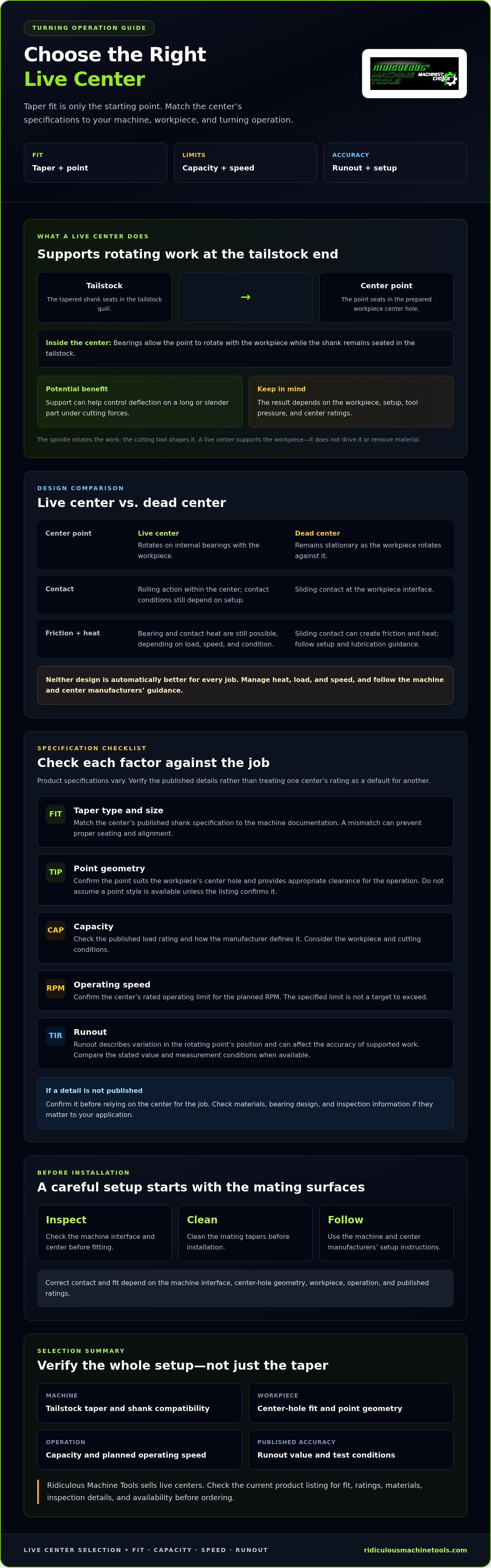
A live center supports a rotating workpiece from the tailstock end of a lathe. Its tapered shank fits the tailstock quill, while its point seats in the workpiece’s center hole. Internal bearings let the point rotate with the workpiece, providing support without the same sliding contact found with a stationary center.
This support can help control deflection on a long or slender part under cutting forces. The result depends on the workpiece, setup, tool pressure, and center ratings. A center doesn’t drive the workpiece or remove material: the spindle rotates the work, and the cutting tool shapes it. For a broader overview of center types and their role in maintaining workpiece concentricity, see Lathe center.
How a Live Center Supports a Rotating Workpiece
The center point contacts the prepared hole at the workpiece end opposite the spindle. The tailstock applies support through the center as the part rotates. Internal bearings allow the point to turn with the work, while the center’s shank remains seated in the tailstock. Correct contact and fit matter. The machine interface, center-hole geometry, workpiece, operation, and published ratings must all be suitable.
Live Center vs. Dead Center: What Changes?
| Feature | Live center | Dead center |
|---|---|---|
| Center point | Rotates on internal bearings with the workpiece | Remains stationary as the workpiece rotates against it |
| Contact | Rolling action within the center; contact conditions still depend on setup | Sliding contact at the workpiece interface |
| Friction and heat | Bearing and contact heat are still possible, depending on load, speed, and condition | Sliding contact can create friction and heat; follow setup and lubrication guidance |
A live center changes where rotation occurs, but it doesn’t remove the need to manage heat, load, or speed. A dead center may suit some operations, while a bearing-supported center may suit others. Don’t assume one design always produces a better finish or longer tool life. Check machine and center manufacturer guidance, and compare the center’s verified taper, speed, capacity, and runout ratings with the job before use.
Live Center Designs and Specifications That Affect Performance
A center’s fit and published ratings determine whether it suits the turning operation. Compare the tailstock interface, point geometry, capacity, operating speed, and runout against the machine and workpiece. Specifications vary by product, so don’t treat one center’s rating as a default for another.
Taper, Point Geometry, and Machine Compatibility
Start with the tailstock documentation. Confirm the taper type and size, then match them to the center’s published shank specification. A mismatch can prevent proper seating and alignment. Point geometry matters too: the point must suit the workpiece’s center hole and provide appropriate clearance for the operation. Don’t assume a particular point style is available or suitable unless the product listing confirms it.
Capacity, Speed, and Runout Ratings
Capacity describes the load a center is rated to support. Consider the workpiece and cutting conditions, and check how the manufacturer defines the rating. The operating-speed limit is the maximum speed specified for that center, not a target to exceed. Runout describes variation in the rotating point’s position, which can affect the accuracy of supported work. Compare the stated measurement and test conditions when available.
Use manufacturer documentation to verify every limit. If a rating or detail isn’t published, confirm it before relying on the center for the job. Ridiculous Machine Tools sells live centers, but specifications such as taper, capacity, speed, runout, material, and inspection details can vary by product. Check the current listing rather than inferring a specification.
Specification checklist
- Taper: Type and size must match the machine documentation.
- Point geometry: Confirm suitability for the workpiece center hole and required tool clearance.
- Capacity: Verify the published load rating for the work and cutting conditions.
- Speed: Confirm the rated operating limit for the planned RPM.
- Runout: Check the stated value and measurement conditions.
- Unlisted details: Confirm materials, bearing design, and inspection information if they matter to the application.
Compare configurations only when their product pages identify the differences and ratings. To review available live center listings, verify each specification against your machine and operation before ordering.
How to Choose a Live Center for the Job
Choose for the job, not just the broad label on a product page. Start with the machine and tailstock interface, then consider the workpiece, turning operation, and required support. Finally, compare each candidate’s published ratings with the conditions it will face. A “heavy-duty” description isn’t a substitute for stated capacity, speed, or runout limits.
Match Center Style to Workpiece and Operation
Consider the workpiece’s shape, length, center-hole condition, and how it will be turned. These factors affect how the center point contacts the part and whether it provides suitable clearance for the cutting tool. Check the lathe manual and workholding documentation if the taper, setup, or allowable operating conditions are unclear. Don’t assume a particular point style is available unless the listing confirms it.
Use this job-first sequence before comparing live centers:
- Identify the machine: Record the lathe and tailstock interface specifications from the machine documentation.
- Describe the workpiece: Note its geometry, center-hole condition, and support needs.
- Define the operation: Account for the turning method and planned operating conditions.
- Verify the center: Match its interface and published ratings to the actual setup.
For related guidance on selecting components across a machining setup, see the tool holding solutions guide.
Build a Specification Comparison Before Buying
Put candidate listings side by side. Record the published value for each field, and flag anything missing as a question to resolve before purchase. Match the stated capacity and speed to the planned operation, and don’t exceed manufacturer limits. Compare runout values using the basis and conditions described in the product documentation.
| Specification | What to compare | If not listed |
|---|---|---|
| Interface | Taper type and size against the machine documentation | Confirm compatibility |
| Point type | Fit with the center hole and required tool clearance | Confirm point geometry |
| Capacity | Published rating against the work and cutting conditions | Ask for the applicable rating |
| Speed | Rated limit against planned operating speed | Confirm the maximum specified RPM |
| Runout | Published value and measurement conditions | Request the specification |
Ridiculous Machine Tools sells live centers, but ratings and availability vary by product. After making your comparison, review the retailer’s live-center options and confirm any missing details before ordering.
Live Center Installation, Setup, and Inspection
Proper installation starts with compatibility, clean contact surfaces, and the manufacturers’ setup instructions. A center that doesn’t seat correctly or support the workpiece as intended can affect stability during cutting. Don’t compensate for a fit problem by forcing the center into place.
Prepare the Tailstock and Center Interface
Identify the required taper type and size in the lathe documentation, then confirm that the center’s interface matches. Before installation, inspect the mating tapers for dirt, chips, or visible damage and clean them according to the machine and center manufacturers’ instructions. Avoid abrasive or corrective methods unless those instructions call for them.
Seat the center as directed by the manufacturer. Before cutting, verify that it’s properly seated and aligned, and that the workpiece center hole is in suitable condition for contact. Correct seating helps establish a stable interface, but it doesn’t replace checking that the center’s ratings suit the job.
Check the Center Before and During Use
Inspect the center for visible damage or contamination before use. Check for rough rotation or unusual movement only as described in the product documentation. Don’t invent a maintenance schedule or rely on an assumed runout threshold. Follow the manufacturer’s inspection and service guidance for the specific center.
- Before installation: Confirm taper compatibility and inspect the center and mating surfaces.
- Before cutting: Check seating, alignment, and workpiece center-hole condition against the setup instructions.
- During operation: Watch for unexpected vibration, heat, or noise. Stop the operation if these occur, then verify the setup and ratings before continuing.
- If an issue remains: Consult the lathe or center manufacturer documentation rather than guessing at an adjustment or repair.
Vibration, heat, and abnormal noise can have more than one cause. They aren’t proof on their own that the center has failed, but they’re reasons to stop and investigate the setup, workpiece support, and operating conditions. Don’t continue beyond a stated speed or capacity limit while trying to diagnose the issue.
For live centers, use the machine and product instructions as the authority for installation and inspection. Review Ridiculous Machine Tools’ live centers, then confirm each listing’s fit and published specifications for your setup before ordering.
Buying Live Centers from Ridiculous Machine Tools
Ridiculous Machine Tools sells live centers alongside other machining and tool-holding components. Use the selection criteria in this guide to assess a specific listing: match the tailstock interface, point configuration, capacity, speed, and runout to your machine, workpiece, and operation. Confirm materials and any other details your application requires before ordering.
What to Confirm on a Live Center Product Listing
Read the specifications, not just the product title. Labels such as “heavy-duty” don’t establish a particular load rating or operating limit. Check that the taper type and size match your machine documentation, and that the point configuration suits the workpiece center hole and required clearance. Then compare the published capacity, speed, and runout with your job requirements.
Use this quick listing check:
- Machine taper: Does the listed interface match the tailstock specification?
- Point configuration: Is it appropriate for the workpiece and operation?
- Capacity and speed: Are the stated limits suitable for the planned setup?
- Runout and material: Are the figures and construction details published and acceptable for the application?
- Availability: Is the option currently listed and available to order?
If a critical detail is absent, don’t infer it from a photo, product name, or another model’s data. Ask the retailer to confirm the specification, or consult the manufacturer documentation, before purchase.
Compare Related Tool-Holding Components
Turning and milling use different workholding interfaces and support methods, so a component listed for one operation isn’t automatically suitable for another. Ridiculous Machine Tools also sells Morse and Jacobs taper adapters. Use their guide to understand adapter interfaces, but don’t assume an adapter makes a live center compatible. Verify the machine, center, and adapter specifications together, and follow the relevant manufacturers’ instructions.
Before ordering, compare the listing with your machine documentation and job requirements. Review live centers and machining components, then confirm application fit, published ratings, materials, and current availability for the specific option.
Choose the Right Center for Your Next Turning Job
A reliable selection starts with a confirmed machine interface and a clear picture of the workpiece and operation. Compare each center’s published taper, point configuration, capacity, speed, and runout with your setup, and follow the manufacturer’s installation and inspection instructions. Don’t rely on product labels or assumed ratings when a specification matters to fit or performance.
Ridiculous Machine Tools sells live centers as well as machining components. Product-specific materials, ratings, and availability should be confirmed on the current listing before purchase.
Use your machine documentation and job requirements as the final check. Then review live centers and confirm the right fit for your setup.
Frequently Asked Questions
What is a live center?
A live center supports a rotating workpiece from the tailstock end of a lathe. Its point turns on internal bearings instead of staying stationary against the workpiece. The center supports the part; it doesn’t drive the spindle or cut material. Before selecting one, check the lathe’s tailstock interface, the workpiece center, the turning operation, and the center’s published ratings. Don’t assume a live center fits every lathe.
What is the difference between a live center and a dead center?
A live center’s point rotates with the workpiece through its bearing assembly. A dead center remains stationary while the workpiece turns against it. These designs differ in how rotation and contact occur, so selection depends on the operation and machine setup. Review the manufacturer’s guidance and compare the intended use and operating limits. Neither type should be assumed to be universally more accurate or suitable.
How do I choose the right live center?
Start with the lathe’s tailstock interface and the workpiece center. Then identify the point geometry needed and compare the center’s documented speed, capacity, and runout with the planned operation. Check every stated limit in the product documentation rather than relying on a general product label. If a listing omits a specification that matters to your setup, confirm it with the seller or manufacturer before ordering.
Can I use any live center in my lathe?
No. Fit depends on whether the center’s taper matches the lathe’s tailstock interface, as well as whether its specifications suit the workpiece and operation. Check the machine documentation and the exact product listing. Appearance or a broad description such as “heavy-duty” doesn’t establish compatibility. If the taper, capacity, or another required rating isn’t stated, get confirmation before purchasing or installing the center.
What do live-center capacity and runout ratings mean?
Capacity is the product’s stated load limit. Runout describes deviation from a true rotational axis. These ratings can be presented with different specifications or measurement conditions, so compare the exact manufacturer data rather than treating one figure as universal. Match the documented limits to your operation. If the listing doesn’t explain how runout was measured, ask the seller or manufacturer for clarification before using that value to compare options.
How can I tell if a live center needs inspection?
Look for visible damage or contamination, and watch for rough rotation, unusual movement, or abnormal noise during use. If the center behaves unexpectedly, stop the operation and check the setup before continuing. Follow the inspection and maintenance instructions for that specific product and machine. Inspection methods and intervals can vary, so don’t substitute a generic schedule or diagnostic tolerance for the manufacturer’s guidance.